Saturday, October 1, 2011

Crazy memory clocking by youngpro with X58A-UD7!

HWBOT held a competition for the month of September called GeIL FFA II Overclocking Challenge. One of the stages was highest frequency with 16GB RAM configuration. Youngpro joined the race with a GIGABYTE X58A-UD7 and 16GB of G.Skill Trident RAM with a stunning 2720MHz overclock. How awesome is that!

He wins a kit of GeIL 2133MHz C9 Evo Corsa 8GB (2x4GB) Dual Channel Memory Kit, congrats.

Friday, September 30, 2011

Play Battlefield 3 the way it’s meant to be played, check out this PC vs XBOX360 vs PS3 video!

Battlefield 3 is going to be a big gaming title but what platform should you choose to play it on. Check our this video comparing what you get with XBOX360, PS3 and PC.

I know which platform I’m playing BF3 on hehehe.

Thursday, September 29, 2011

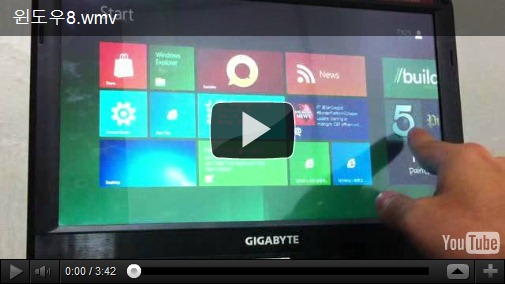
Windows 8 shown off on GIGABYTE T1125 Touch-Notebook by an end user in Korea, very cool!

Windows 8 is around the corner and it looks really cool. I haven't seen much of these demos until I came across this youtube video by an end user in Korea going through the menus on a GIGABYTE T1125 Touch-Notebook.

Looks nice and it seems pretty responsive. I’m thinking touchscreen LCDs might become popular soon on desktop PCs, yay TouchBIOS (dreams of The Island movie scene office desk powered by Win8 hahaha)

Wednesday, September 28, 2011

GIGABYTE launches LAN Optimizer utility

image

High-end technologies usually take some time to trickle down to mainstream products due to the slow rate at which prices come down to everyday user affordability. In the case of easy network management, it has taken a lot less time than we would have expected, and we have just announced GIGABYTE LAN Optimizer that allows you to prioritize programs accessing your Internet connection, offering more bandwidth control than has ever been available on mainstream platforms. Check out the GIGABYTE LAN Optimizer press release for a full list of supporting motherboard models (at least 27 of them).

image

We first saw this kind of feature on the extremely high-end G1-Killer gaming motherboards from the feature-packed Killer e2100 gaming LAN solution from Big Foot Networks. GIGABYTE LAN Optimizer is a somewhat simpler, yet effective and fun solution. There are 4 modes that allow you to optimize bandwidth for gaming, video streaming or browsing, and of course there is also an auto mode that dynamically optimizes bandwidth as you go.

image

Check out the GIGABYTE LAN Optimizer video, the GIGABYTE LAN Optimizer press release or our GIGABYTE LAN Optimizer microsite the for more.

Vivi from South Africa does a nice clean review of power delivery on GIGABYTE G1 Sniper2, check it out!

logobsVivi just put an interesting read on GIGABYTE G1 Sniper2 voltage regulation.

Vivi is a well known South African overclocker, well regarded in extreme overclocking circles. It’s nice to see him spend time showing his readers how to understand more about hardware we use for gaming these days without taking himself too seriously.

It is not often you see a pretty straight forward and easy to read article on power delivery for a piece of hardware. No need for a degree in electrical engineering to figure this one out, check it all out at Xtreme Systems forum.

scopeexplain

tempspwm

Tuesday, September 27, 2011

Awesome G1.Assassin case mod

image

Our good friends over at Cooler Master have posted some really cool pictures of a G1.Assassin case mod on their facebook page. The original article is from PConline in China. This is without a doubt one of the most impressive military style case  mods that I’ve seen and is a tribute to the growing talent and enthusiasm for case modding that we are seeing from China. Here are some more shots for your viewing pleasure:

image

image

image

image

image

Feel free to post more case mod links below. We’ll post ‘em if we like ‘em!

Sandy Bridge E dreams of theoretical 9.5GHz clock speeds!

Yesterday we posted an article that outlined the mechanics of how Intel’s forthcoming Sand Bridge E processors will be overclocked – thanks to Bit-Tech for that one. Today we’ve come across an Intel slide that appears to have gotten into the hands of Taiwanese techies at TopPC.com.tw which outlines a ‘theoretical’ upper limit to the Sandy Bridge processor architecture. According to the slide, which offers details about base clock speeds and Turbo speeds, when you take into account the Base Clock (blck) maximum, and maximum processor multiplier, a CPU core clock ceiling of exactly 9.5GHz is apparent. Check the image below.

x79-1

Clearly interesting times lie ahead for overclockers and extreme system tuners once Sandy Bridge E arrives. But let’s also be realistic; a theoretical limit is exactly that, it basically means that the processors microcode will understand instructions and offer BIOS configurations that will end at 9.5GHz. It is however unlikely that anyone will ever get to that speed. Look at it this way. Previous gen Gulftown processors had a theoretical limit of approx 16GHz! However, we rarely ever saw one push 7GHz…

Interesting to note that AMD just broke the world record a week or so ago for the "Highest Frequency of a Computer Processor" using a new Bulldozer FX processor doing at an astonishing 8.429GHz on liquid helium.

So yeah, we’re living in very interesting times indeed, with two new and competing enthusiast platforms just around the corner. It’s safe to say that we’re more than looking forward to launching a range of motherboards that’ll give you every excuse to Overclock your Bulldozer or Sandy Bridge E CPU to the limit, including one particular X79 board model which is optimized precisely for that purpose – watch this space!

News sources at Top PC.com.tw and VR-Zone.

Monday, September 26, 2011

Kingston demo 64GB of memory on GIGABYTE X79-UD5

 IMG_0238_575px

One of the most eye-catching technical specs regarding the Intel’s new Sandy-Bridge E platform revealed at IDF last week, is without doubt its quad channel memory infrastructure. While today’s Sandy Bridge uses dual channel memory and the X58 Gulftown platform boasted triple channel, the forthcoming X79 platform is going all out with four channels of DDR3 . As if in celebration, Kingston had a demo at IDF that showed what you can do with four channels of RAM, demoing a GIGABYTE X79-UD5 board packing 8 x 8GB DDR3 DIMMs for a massive 64GB of system memory!

IMG_0239_575px

IMG_0244_575px

Thanks to AnandTech for the images. Check out the full article here.

Bit-Tech takes a peek at Sandy Bridge E Overclocking

overclock-sandy-bridge-e-1

Clive Webster published an interesting article last week that offers a glimpse in to how we are going to Overclock the next enthusiast processor family from the Intel. Codenamed Sandy Bridge E, Intel’s new enthusiast range is understandably starting to catch the attention of the Overclocking fraternity, who will be curious to read Clive’s initial analysis during the IDF show were Intel offered demonstration overclocks to media.

“All of Intel’s demonstration overclocks at IDF 2011 involved System Clock, CPU divider and CPU multiplier tinkering, but we saw enough to explain how to overclock a ‘locked’ Sandy Bridge E processor. Intel is still recommending that you don’t take the System Clock beyond 5 per cent of the nominal 100MHz, so to overclock a ‘locked’ Sandy Bridge E CPU you need to balance that 95-105MHz System Clock range with a gearing of 1.25x or 1.66x, and possibly by dropping the CPU multiplier.

overclock-sandy-bridge-e-2

There are a couple of other noteworthy features of Sandy Bridge E when it comes to overclocking. For example, the memory straps of a Sandy Bridge E system are still in 266MHz increments (Ivy Bridge will introduce finer control for the memory controller), and it still supports XMP for easy memory overclocking. We should also see the same voltage options in a Sandy Bridge E system as a Sandy Bridge system, as the voltage planes haven’t changed. This will mean two primary voltage options - one for the cores and one for the uncore area (the System Agent, memory controller, DMI controller, PCI-E controller and everything else that isn’t an execution core).”

You can expect to see many more articles focusing on how to squeeze the most out of Sandy Bridge E processors, and plenty using X79 series GIGABYTE boards. Read the full article here on Bit-Tech.net

Thursday, September 22, 2011

Atomic PC: G1.Sniper 2 headshots the competition

G1-Killer Sniper2_pic

Vito Cassisi at Aussie review house Atomic PC now joins a long and growing list of reviewers that have tasted the incredible gaming delights of our new Sandy Bridge G-Killer board, the G1. Sniper 2. Applause to Vito for asking the most important question:

“Does it kick arse?
We've met the G1.Assassin previously, and  were very impressed by the board. We weren't so keen on the cost. The Sniper 2 is certainly cheaper, but does can it match the X58 variant in performance and features?

We entered the familiar blue BIOS screen and got right into tweaking. We started off by setting the core voltage to 1.45v and ramping up PWM and Over Current Protection to avoid being held back. The memory was then set to 1866MHz and the CPU multiplier to 50x for a 5GHz overclock. After confirming stability with Prime95, a 51x multiplier was used, and then 52x which didn't last too long under stress. Reducing the base clock to 99.5 MHz and increasing the voltage to 1.49v (level 7 LLC) scored us a stable overclock of 5174MHz, which is an admirable achievement. We couldn't raise the memory clock to 2133MHz without very loose timings, so we stuck to the default XMP profile throughout.

Compared to the ASUS Sabertooth P67 we reviewed in June, the extra 150MHz gives the G1.Sniper 2 a clear advantage in benchmark scores, bar the Everest read test due to the lack of a memory overclock. It even gives the G1.Assassin a run for its money - the X58 platform struggles to compete.

If the previous G1.Killer range enticed you, but the price or platform held you back, we highly recommend this board. We're eager to try an Ivy Bridge processor with it!”

Great to see we won the Atomic Hot Award. Really appreciate the love guys…

Check the review in full on Atomic PC here.

Check the G1.Sniper 2 specs here.